

Nobody writes a timesheet. Nobody types a task code. The work records itself.
DeskTick keeps the record — sessions, files, branches, commits, pull requests. What it becomes depends on who reads it.
You were active for 7h 41m — above your 6h 05m average — with 4h 52m in deep focus, mostly in VS Code on the checkout-flow refactor. Your 9–11 AM block produced 61% of it.
- ✓ Protect the 9–11 AM block
- ✓ Batch Slack into windows
- Input required
- 0 words typed
- Sources
- sessions · files · branches · commits · PRs
- Developers
- Free forever
- Workspaces
- From $13 / seat
Six chores, deleted
Every Friday. Every single one. Each line below is something DeskTick does instead — and what was actually recorded is on the board, to the minute.
- 01
Fill in timesheet, Mon–Fri - 02
Find the bug's task code DT-4?? - 03
Ask Priya what this one was DT-47? - 04
Update ticket statuses - 05
Write standup notes for Monday - 06
Chase the team for hours by 5pm
Seven things happen, and none of them are typing
Start the timer
Pick the task in the desktop app and press Start. Nothing else is entered.
timer started · DESK-296 Developer profile routeThe board lights up
The task's card shows the clock running, live. Nobody has to ask what you are on.
board · DESK-296 · 00:00:01 trackingThe branch names itself
Run deskgit, pick the type and the task, and the branch is named and created for you.
deskgit › feature/DESK-296-developer-profileFiles get their hours
Time is recorded against CartProvider.tsx, not just against the editor.
CartProvider.tsx · 1h 52m recordedThe commit carries its key
DeskGit opens the summary on DESK-296/. You write the sentence, never the command.
deskgit › DESK-296/ Public profile page and its loaderThe PR posts itself
It lands in #pull-requests in DeskHuddle, and the card on the board gets its reviewers.
#pull-requests ← PR #482 opened · 2 reviewersIt ships, and the card moves
Approved and merged: the card moves itself to Done, with the time the task took.
board · DESK-296 → Done · 4h 16m on taskThe day files itself
The sessions are the timesheet and the attendance, and the AI writes up where the day went.
timesheet 8h 01m · present · report written, 0 words typed
A profile built from the record, not a CV
The hours, companies and commits behind it stay with you, not with an employer. What you type about yourself is shown as your own account — separate from what was recorded and what somebody else confirmed.
- Hours · verified
- 2,140
- Companies · verified
- 3
- Commits · verified
- 4,812
- PRs · verified
- 391
- Hours
- 2,140
- Companies
- 3
- Commits
- 4,812
- PRs
- 391
- Commits
- 695
- Pull requests
- 712
- Repos
- 133
Six steps, in an order that makes sense
What you do first, what you say, what proves it, who sees it. “Finish later” sits under every one of them.
Start with what you do
Specialization, three to eight skills, the languages you work in and a bio your AI reports read. Photo and CV, name and headline, where you are.
What you say you have done
Past employments and links. Self-declared, and badged as such — your years of experience are counted from them.
And what proves who you are
Education, certifications and identity documents, all in one place.
You decide who sees it
Handle, availability and job preferences. The directory is a choice, not a default.
Then somebody else confirms it
GitHub or Bitbucket, LinkedIn and LeetCode.
Paperwork, last
Bank account, addresses and terms — agreed last, having seen everything they cover.
Confirmed by somebody else, kept by you
GitHub or Bitbucket
If you write codeProves the account is yours and counts your activity — private repositories included, as a number. We never read a repository, an organisation or an employer.
Signing in proves the profile is yours.
LeetCode
No token heldYou claim a username, we issue a code, you paste it into your summary, and we read it back.
- Identity documents
Optional and encrypted at rest. Never on your public profile.
- Phone and date of birth
Optional and private. Released only to a company that hires you — your phone is on your profile only if you switch that on.
- Talent directory
A choice, not a default. You can be listed and not looking.
- Addresses
Private. Used for payroll and documents only if you are hired.
Find them by the work, hire them in one thread
Included in every paid plan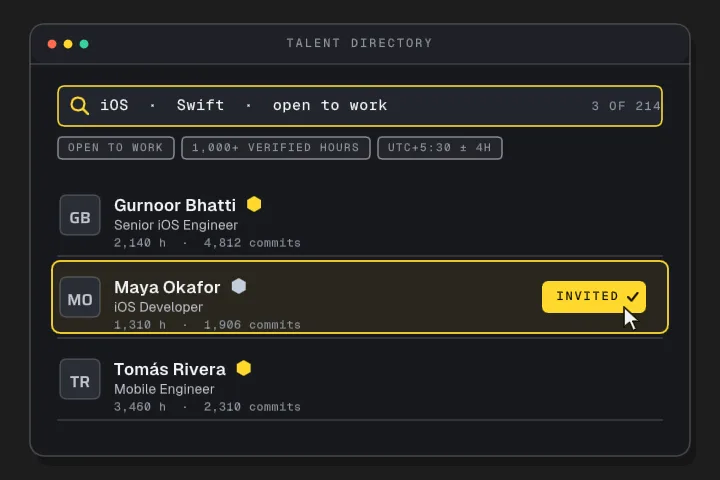
Search to first day, told as one hire: who does what, what the other side sees, and the rule behind each step.
See how hiring works →Per seat, per month, and nothing metered at you
One price for a seat, whatever that person uses. Paying yearly buys a cheaper month — you are still billed for twelve of them.
Free
A workspace to try it in.
- 1 member — you
- 2 projects, 20 tasks per project
- Time tracking and the desktop app
- DeskGit CLI
- One connected account — GitHub only
- 1 GB storage
Lite
Uncapped project management, and the day written up.
- Everything in Free, uncapped:
- Unlimited members, projects and tasks
- Talent search and the hiring pipeline
- AI reports — 60 per seat a month
- 100 GB storage
Project Management
Everything: the board, the chat, DeskBrain, the lot.
- Everything in Lite, plus:
- Whiteboard and presenting
- DeskHuddle chat
- DeskBrain answers — 500 per seat a month
- AI reports — 150 per seat a month
- 250 GB storage
- SSO and custom branding
Something the plans do not cover
Custom roles and permissions, module control per workspace, SSO enforcement and provisioning, invoicing and purchase orders, volume seats. Granted after a conversation rather than a card number.
Developers never pay — the profile, the record and the CLI are free to the person doing the work.
Questions, answered
Still have one? Write to [email protected].
No. The profile, the record and the CLI are free to the person doing the work. Workspaces pay per seat.
No. Connecting GitHub or Bitbucket proves the account is yours and counts your activity — private repositories included, as a number. We never read a repository, an organisation or an employer.
Only if your specialization writes code. Specialization is the first thing we ask, because it decides what you are asked to connect.
Yes. “Finish later” sits under every step, and it is always there.
It buys a cheaper month: $11 instead of $13 on Lite, and $16 instead of $19 on Project Management. You are still billed for twelve of them.
- Time on this page
- 00:00
- Sections read
- 0 of 10
- Words you typed
- 0